Full Claude Guide: Beginner to Pro in Under 15 Minutes
Why I moved from ChatGPT and Gemini to Claude, and how the right setup takes you from beginner to pro in fifteen minutes.

You use Claude as a faster Google. And it is costing you your edge.
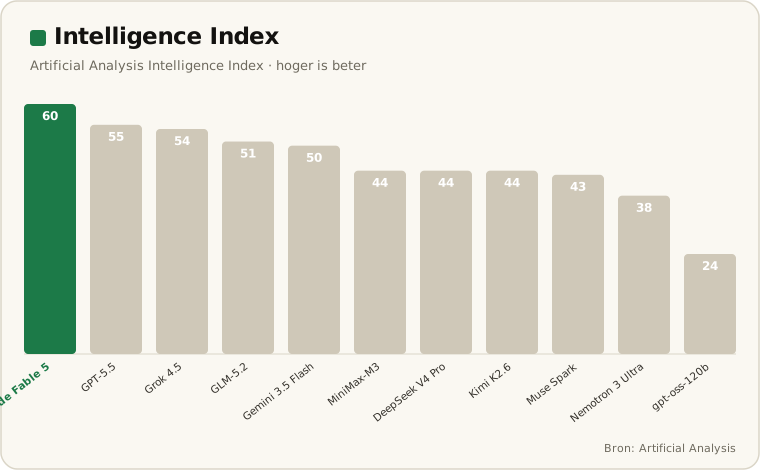
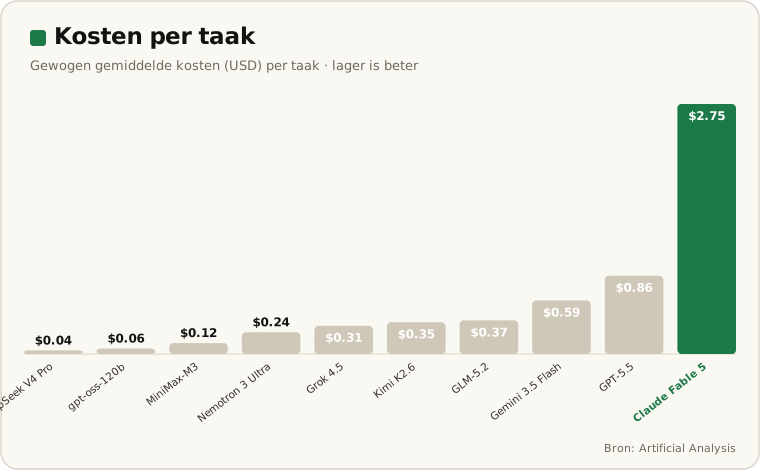
Claude from beginner to pro in fifteen minutes. This is the guide I wish I had had myself. But first: why I switched. Until October last year I mostly worked with ChatGPT, occasionally Gemini. Fine for simple work: tasks that need no built-up context. In the independent benchmarks from Artificial Analysis and Arena.ai Claude consistently scored well, but I only noticed the difference in practice. Take email. Someone sends me a question, and I never let AI send that answer itself. It drafts, I check and send, or I do it myself after all. Because whoever emails a person expects a person; an AI answer does not always land well, even if it is exactly what they were looking for. At the same time, the way I handle such an email is a fixed method: which sources I check, how heavily I weigh something, how I write. Once I map that sharply, AI can take it over and go further than I can alone: I am limited to a few searches and a narrow focus, a model is not. That is where the power is for me: I am the specialist, the source, and I feed my way of working into it over time. And that is exactly where Claude gets ahead of the rest.
Most e-commerce teams I come across use AI at amateur level. One question in, one answer out, tab closed. No memory, no context, no process.
It is like having a NASA supercomputer and using it to calculate 2+2.
Level 1: the amateur wastes 95%
The problem is not that the tool falls short. The problem is that you treat it like a search engine.
Two free techniques close most of the quality gap. No subscription, no training. One sentence.
The first: let Claude interview you before it answers. Type "first ask me all the questions you need to do this well" and see which context it requests. The second: let it check its own work. "Check your work" and it catches its own mistakes.
This costs you nothing. And yet almost nobody does it.
Level 2: persistent memory is the real lever
Memory lets quality compound
Without memory you start every session from zero. With a project memory, context stacks up, the output becomes compound interest instead of loose answers.
The biggest gain is not in better prompts. It is in memory that stays.
Claude has a feature called projects. A project is a workspace per role, per client or per workflow in which the AI remembers who you are. The output gets better every time instead of starting from scratch each time.
Setting it up is simple. Create a project, give it the name of your role, and build a master prompt.
A master prompt is a document that tells the AI everything about you. How you work, what your team looks like, which tools you use, how your brand sounds. You can ask Claude to interview you so that document forms on its own.
Here is the framework most people miss. The master prompt is the ingredients: who you are. The system prompt is the recipe: your process.
And you probably already have that process. You just never wrote it down.
I ran the marketplace launch not as a channel chore but as a programme: cross-functional team, international expansion strategy, content automation framework and workflow optimisation so product data was not rebuilt per country. Made customer satisfaction measurable and improved it, first did customer service myself to understand it, only then outsourced.
_Do customer service yourself before you outsource it, and automate content before you scale internationally, not after_
The NL application: what belongs in your marketplace project folder
Marketplace project folder
Record the platform rules once, Buy Box conditions, VAT logic per EU country, listing conventions. After that, one person matches the output of a whole content team.
For Amazon NL and Bol.com this gets very concrete. You build a project per platform with the rules that make the platform unique.
Think of Buy Box conditions, VAT logic per EU country, and the listing conventions that are different on Bol than on Amazon. Record that once. After that, one person matches the output of a whole content team.
I wrote earlier about why your marketplace listings do not convert and about the difference between Amazon and Bol.com in 2026. Both problems become manageable once you encode the platform rules in a project.
The deeper thesis: encoding wins, not prompting
The real risk is not that AI replaces you. The risk is that your competitor records their tacit knowledge sooner than you do.
Whoever documents their process first, scales it first. That is not a prompt trick. That is a moat.
Whoever wants more on how AI shapes your interface with your customer, read Designing with LLMs.
The honest caveat
The cynic has a point. This is partly overhead, and that setup investment is real.
It pays off for repeated workflows. Not for a one-off task. A listing process you run every week deserves a project. A one-off analysis does not.
What this means for your team in 2026
Do not start with a better prompt. Start by writing down your process.
Want to know which of your e-commerce workflows are fastest to encode? Book a consult. Then we look together at where your edge is.
Want to spar about your marketplace strategy?
No hype. A sober look at where your growth is and where margin leaks away.
Get in touch